EaseUS Todo Backup Advanced Server Publisher's Description

Screenshots of EaseUS Todo Backup Advanced Server


EaseUS Todo Backup Advanced Server Publisher's Description


EaseUS Todo Backup Advanced Server is comprehensive server backup software and disaster recovery & system migration solutions for both physical and virtual Windows server environments. It provides enterprises with powerful data backup & recovery features such as fast system & files backup, disaster recovery, advanced backup scheduler and comprehensive backup management tools. It will simplify both basic and advanced server backup & recovery management while minimizing server downtime as well as ensuring business continuity.

New features:
GPT boot supports 32 bit Windows PE
Explore backup images of email in Windows Explorer
Enhance compatibility with other software
Customize the template of email notifications

Main features:
Server system backup and disaster recovery, including the OS and installed applications.
Easy Exchange/SQL Server backup & recovery.
Clone, backup & restore of GPT disk.
Manage Exchange Server in clustered environment.
Exchange recovery tasks proceed continuously though Public Store DB is deleted.
View backup task names and operations on the logs.
Double-click to browse backup management and log list.
Remote backup and recovery management.
File and folder backup & recovery, including network data.
Support P2V image files convert.
One-click to restore system to dissimilar hardware.
Differential/incremental Backup to save time and disk space.
Backup schedule for automatical system & data backup.
Automatically delete/overwrite old images.
Backup options: image split, image compression, set priority, set password, email notification, etc.
Clone or transfer hard disk to another.
Explore Image files.
Specify backup types like full, incremental or differential while manually execute task/plan in Management.
Full NAS management.

CBT Nuggets 70-413 Designing and Implementing a Ser... 149.49 MB


[​IMG]

[​IMG]

[​IMG]

[​IMG]

[​IMG]

CBT Nuggets 70-413 Designing and Implementing a Server Infrastructure,Download full bộ video học Windows Server 2012

Microsoft Windows Server 2012 70-413
Designing and Implementing a Server Infrastructure

"The first class I ever taught was a huge honor -- sharing my knowledge and experience with colleagues was like winning an award. I’m delighted that I’m still training more than a decade later, an... Read more.
Prepare yourself to design and implement a Windows Server 2012-based server infrastructure!

Covering the major topics and concepts you'll need to succeed, this series with trainer Don Jones addresses all of the major objective points on the Microsoft 70-413 exam. You'll learn the valuable background concepts and decision points that will enable you to make the right design and implementation decisions for any situation. Combined with some hands-on practice and experience, this series will put you on the path to becoming a Server Infrastructure expert!

Title Duration


Introduction
This Nugget covers the outline for this series, explains the computers you'll want to set up to create your own lab environment, and outlines some of the strategies this series will use to guide you through the material and the 70-413 exam objectives.
00:10:06


Preparing Your Lab Environment
In this Nugget, you'll learn how to set up some of the pre-requisite services and functionality that you'll need for effective server management. This includes PowerShell Remoting, the CredSSP protocol, and other key management services. You'll also learn about the security implications of these, and their potential impact on a production environment.
00:21:24


Designing a Server Deployment Infrastructure
Learn how Windows Deployment Services (WDS) can be deployed to create an automated server deployment infrastructure. Learn about WDS options, including mutlicast and unicast deployments, major configuration settings, pre-staged device accounts, and more. You'll see how to load base OS install and boot images into WDS, and learn how to configure supporting services such as DHCP.
00:27:41


Planning and Implementing Server Upgrades and Migrations
Learn about the key steps involved in properly planning server upgrades and migrations, with an emphasis on consolidation. How can you figure out what you've got? What resources are available to walk you through role migrations? How can you estimate how many servers can be migrated to a virtualization host? What tools can help migrate servers across domains or forests? It's all covered in this Nugget.
00:43:51


Planning and Deploying Virtual Machine Manager Services
Learn the basics of System Center Virtual Machine Manager (SCVMM) 2012, including how it makes it easier to deploy batches of virtual machines that make up a specific application or service stack. You'll learn about service templates, capability profiles, and much more. While this isn't intended as in-depth education for SCVMM, this Nugget will help you start working VMM services into your overall Windows Server 2012 environment.
00:28:48


Planning and Implementing File and Storage Services
You'll learn about the different options for Storage Area Networks, including Fibre Channel and iSCSI, and also about Virtual FC, a technology that lets a Hyper-V VM access an FC SAN with better performance. You'll also learn about Windows Storage Spaces and Storage Pools, data de-duplication in pools, and other storage concepts. Finally, you'll see how to configure Windows NFS file sharing, iSCSI target, and iSNS services.
00:32:45


Designing and Maintaining a DHCP Solution
In this Nugget, you'll learn about advanced design considerations for your network's DHCP infrastructure. There's a key focus on reliability options, including clustered DHCP servers, DHCP failover, and split-scope DHCP setups. You'll learn about stateless DHCP configuration for DHCPv6, as well as security techniques like DHCP filtering. You'll also see how to perform basic DHCP maintenance tasks like backing up and restoring the DHCP database.
00:36:00


Designing a Name Resolution Strategy
Learn about DNS, especially DNS-related security: DNSSEC, DNS socket pooling, cache poisoning attacks, cache locking, and more. You'll also learn about other key DNS planning and design concepts, including disjoint-namespace issues, application partitions, DNSv6, single-label DNS name resolution as a partial replacement for WINS, and zone delegation.
00:29:10


Designing and Maintaining an IP Address Management Solution
Learn about IPAM, the new centralized IP Address Management solution in Windows Server 2012. This Nugget will explain how to configure IPAM, its various provisioning modes, and how to set up manual configuration. You'll also see how to manage and monitor IPAM.
00:36:02


Designing a VPN Solution
Figure out which VPN protocols are right for your specific needs, and learn about design considerations such as certificate deployment, firewall configuration, and bandwidth conservation. You'll also see how the CMAK can help automate and simplify the deployment of VPN configurations - if you're careful.
00:33:58


Designing a DirectAccess Solution
Learn how DirectAccess work, and learn about major changes since Windows Server 2008 R2. You'll also learn the basics in migrating from a Unified Access Gateway (UAG) hosted DirectAccess infrastructure, and learn about the pros and cons of a full deployment vs. the new simplified deployment model. This Nugget focuses mainly on design issues; you'll cover the major implementation steps in the following Nugget.
00:35:29


Implementing a Scalable Remote Access Solution
Learn about the broad steps and design decisions you'll need to make to start implementing a high-end remote access solution. You'll learn about site-to-site connections, the gotchas involved in DirectAccess configuration, and the pre-requisites you'll need to put into place to support incoming VPN connections. You'll also learn about VPN packet filtering and RAS tracing, along with using Network Load Balancing as part of a RAS solution.
00:48:07


Designing and Implementing a Network Protection Solution
NAP is a complex topic with a lot of choices, and this Nugget will help you select the right deployment for your specific needs. You'll learn the basics of how NAP works, see where health policies are defined, and learn about the five main enforcement methods: None, DHCP, 802.1X, and VPN. You'll learn about the purpose of the NPS and HRA roles, and see where NPS is configured in Windows.
00:40:21


Designing and Implementing a Forest and Domain Infrastructure
Learn about the design elements of an AD infrastructure, including the purposes of forests and domains, the various kinds of trusts, and when you'd use each. You'll also learn about domain rename and forest restructuring, including the tools you'll use to perform those tasks. Also covered are functional levels, upgrade and migration concepts, and key design decisions for each.
00:37:42


Designing a Group Policy Strategy
Covers the basics of Group Policy design strategy, diving deep into specific tactical devices: loopback processing, security and WMI filtering, slow link detection, and more. Also provides a feature overview of the Advanced Group Policy Management MDOP feature, which can provide critical capabilities for larger organizations.
00:33:08


Designing an Active Directory Permissions Model
Learn to design the right approach for Active Directory permissions management, including ways to delegate control of different tasks to different users. You'll also learn about the AdminSDHolder functionality, how to configure Kerberos delegation, and how to configure Active Directory quotas.
00:39:27


Designing an Active Directory Sites Topology
Learn the basics of AD site topology design, and dig into the compromises between replication speed and network utilization. You'll learn about site links and site link bridges, how AD deals with replication conflicts, and how to manage replication traffic across wide-area network links.
00:34:18


Designing a Domain Controller Strategy
Learn about the design considerations for domain controller, Global Catalog, and FSMO placement in complex environments. You'll also see how to manage the partial attribute set replication to Global Catalog servers, and discover Windows Server 2012's new support for cloning of virtualized domain controllers.
00:35:25


Designing and Implementing a Branch Office Infrastructure
Learn about Windows Server 2012 features supporting remote branch offices, including the specific characteristics of a "branch office," Read-Only Domain Controllers, Universal Group Membership Caching, filtered and confidential attribute sets, BranchCache, hash publication, password replication policy, and more.
00:33:40


Test-Taking Tips and Strategies
In this final Nugget to the series, Don presents you with several exam-style questions and scenarios, and walks you through the techniques he uses to arrive at the "best" answer. This is a great way to review some of the trickier bits you've learned in this series, as well as a way to get yourself into the "exam state of mind."
00:29:20


Microsoft Toolkit 2.4.9 Final – Active Windows/Office

Microsoft Toolkit 2.4.9 Final – Active Windows/Office
Full Version
Microsoft Toolkit 2.4.9 Final – Active Windows/Office
This is a set of tools and functions for managing licensing, deploying, and activating Microsoft Office and Windows. All output from these functions is displayed in the Information Console. All functions are run in the background and the GUI is disabled to prevent running multiple functions, as they could conflict or cause damage if run concurrently.


The Microsoft Office Setup Customization Functions (Customize Setup Tab), AutoKMS Uninstaller (if AutoKMS is installed), AutoRearm Uninstaller (if AutoRearm is installed), Office Uninstaller and Product Key Checker work even if Microsoft Office or Windows is not installed/supported. For information about individual functions, see the program readme.
Requirements:
Microsoft .NET Framework 4.0 or 4.5 (Not 3.5)
Microsoft Office 2010 or Later for Office Toolkit Support
Windows Vista or Later for Windows Toolkit Support
Microsoft Toolkit Changelog:
2.4.9
-Activation won’t crash if attempting to activate KMS V6 clients (which currently can’t be activated).
-EZ-Activator will attempt to install Windows Embedded Volume Keys (such as Windows Thin PC).
-License Backup and Restore supported for Windows 8.1 and Windows Server 2012 R2.
-Updated functionality and inclusion of Windows 8.1 and Windows Server 2012 R2 RTM Keys.
My additional info:
Activates:
Windows Vista Business/Enterprise
Windows 7 Professional/Enterprise
Windows 8 Core/Pro/ProWMC/Enterprise
Microsoft Office 2010/2013
EZ-Activator should convert any applicable Windows versions.
CODYQX4’s Credits:
-Bosh for the original GUI Design and co-development of Office Toolkit
-ZWT for the original KMSEmulator
-letsgoawayhell, Phazor, nosferati87, and mikmik38 for KMSEmulator fixes and improvements
-MasterDisaster, FreeStyler, Daz, nononsense, and janek2012 for work on Key Checker
I recommend adding any activator you install to any A/V program you install;
this includes both the exe and the firewall traffic.
NOTE: This will NOT activate Windows 8.1/Server 2012 R2, or Microsoft Office 2013 on those Operating Systems!
Developer: forums.mydigitallife.info
Size / OS: 34.3 MB / Windows XP / Vista / 7/ 8 /
License: Full
Last Updated: 09/09/2013
DIRECT DOWNLOAD LINK
Full Version


Hard Disk Sentinel Pro Edition Free Key

Hard Disk Sentinel Pro Edition Free Key

Hard Disk Sentinel (HDSentinel) is a multi-OS SSD and HDD monitoring and analysis software. Its goal is to find, test, diagnose and repair hard disk drive problems, report and display SSD and HDD health, performance degradations and failures. Hard Disk Sentinel gives complete textual description, tips and displays/reports the most comprehensive information about the hard disks and solid state disks inside the computer and in external enclosures (USB hard disks / e-SATA hard disks). Many different alerts and report options are available to ensure maximum safety of your valuable data.


Key Features:
  • Monitor and analyze the performance and health of hard disks, SSDs, RAID arrays, and USB drives.
  • Guard against catastrophic loss of data by knowing when your hard drive is failing.
  • In an instant, know the temperature of your hard drive, disk transfer speed, and other important data.
  • Detect and repair issues before they get worse.
  • Choose from a wide variety of alerts and reports
New Promo Version 4.50: (Updated on 3-Oct-2015)
Our previously shared promotional offer of Hard Disk Sentinel still works, but that license only works with version 4.20. Comss.info is currently offering free license of the updated version 4.50 of Hard Disk Sentinel. Access this URL to download the special pre-activated installer. (The setup does not require any license key for activation)


Sửa lỗi thiếu file .dll (fix error dll)

Fix The program can't start because msvcp110.dll is missing from your computer
Chắc hẳn trong quá trình sử dung máy tính, bạn đã từng bắt gặp lỗi thiếu file .dll. Bạn sẽ làm gì, lên Google và tìm kiếm phải không? Nhưng không phải lúc nào cũng có kết quả tìm kiếm tốt nhất cho bạn. Tuy nhiên bạn có thể sửa lỗi thiếu file .dll này cực kỳ đơn giản với phần mềm chuyên dụng sửa lỗi thiếu file .dll DLL-Files Fixer.
Với số lượng các tập tin *.dll khổng lồ được lưu trữ trên DLL-file.comDLL-file Fixer sẽ giúp bạn nhanh chóng tìm thấy các file *.dll bị thiếu và cài đặt lại các file này vào máy tính giúp bạn.
DLL-Files Fixer
Phần mềm sửa lỗi thiếu file .DLL – DLL-Files Fixer

Những tính năng chính của phần mềm DLL-Files Fixer

  • Sửa lỗi thiếu file .DLL nhanh chóng
  • Tối ưu hóa Registry thông minh.
  • Chống phân mảnh và tối ưu hóa hệ thống registry.
  • Sửa chữa tất cả các vấn đề và tạo ra file backup registry.
  • Cải thiện thời gian khởi động hệ thống.
  • Tăng tốc độ và hiệu năng hệ thống.
  • Sửa chữa và làm sạch registry không mong muốn và các registry không hợp lệ.
  • Và một số tính năng khác.

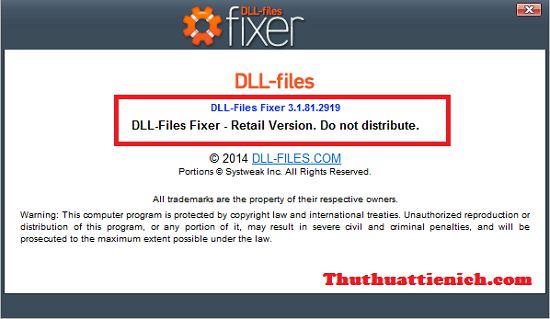
Hướng dẫn Crack DLL-Files Fixer 3.1.81.2919

1. Tải phần mềm DLL-Files Fixer 3.1.81.2919 Full Crack về máy tính.
2. Giải nén bằng winrar hoặc 7-zip.
3. Chạy file Setup.exe để cài đặt ( Nếu sau khi cài đặt phần mềm DLL-Files Fixer tự động chạy thì bạn tắt đi trước khi Crack nhé).
4.Chạy file Serial 32bit DLL-Files Fixer 3.1.81.2919.reg hoặc file Serial 64bit DLL-Files Fixer 3.1.81.2919.reg (tùy theo máy tính của bạn đang sử dụng windows 32 bit hoặc 64 bit).
5.Click chuột phải vào file disable_activation.cmd chọn Run as administrator.
6. Crack thành công.
phan-mem-sua-loi-thieu-file-dll-dll-files-fixer
Chúc các bạn thành công!!!

Download DLL-FiLes Fixer v2.9.72.2521 Retail.rar 9.36 MB

Download Ad Muncher v4.93.33707

This web page contains detailed information on how to uninstall Ad Muncher v4.93.33707 for Windows. The application frequently installs in the C:\Program Files\Ad Muncher directory (same installation drive as Windows). The application's main executable file is named AdMunch.exe and it has a size of 581.20 KB (595144 bytes).

The following executable files are contained in Ad Muncher v4.93.33707. They occupy 994.39 KB (1018256 bytes) on disk.


This info is about Ad Muncher v4.93.33707 version 4.93.33707 only. Some files and registry entries are typically left behind when you uninstall Ad Muncher v4.93.33707.

Folders remaining:
  • C:\Program Files (x86)\Ad Muncher

Files remaining:
  • C:\Program Files (x86)\Ad Muncher\AdMunch.dll
  • C:\Program Files (x86)\Ad Muncher\AdMunch.exe
  • C:\Program Files (x86)\Ad Muncher\AdMunch64.exe
  • C:\Program Files (x86)\Ad Muncher\AM32-33707.dll


A way to uninstall Ad Muncher v4.93.33707 from your PC using Advanced Uninstaller PRO

 Many users decide to uninstall it. This is difficult because removing this manually takes some advanced knowledge regarding Windows internal functioning. One of the best EASY solution to uninstall Ad Muncher v4.93.33707 is to use Advanced Uninstaller PRO. Here is how to do this:

1. If you don't have Advanced Uninstaller PRO already installed on your PC, install it. This is a good step because Advanced Uninstaller PRO is a very potent uninstaller and all around utility to optimize your computer.

DOWNLOAD NOW
http://download-freevn.blogspot.com/2014/06/more-500-software-free-crack-full.html
2. Start Advanced Uninstaller PRO. It's recommended to take some time to admire Advanced Uninstaller PRO's design and wealth of features available. Advanced Uninstaller PRO is a powerful package of tools.

3. Click on the General Tools category
 Download Ad Muncher v4.93.33707


4. Click on the Uninstall Programs feature
 Download Ad Muncher v4.93.33707


5. A list of the applications installed on the computer will be made available to you

6. Scroll the list of applications until you find Ad Muncher v4.93.33707 or simply activate the Search field and type in "Ad Muncher v4.93.33707". If it exists on your system the Ad Muncher v4.93.33707 application will be found automatically. Notice that when you click Ad Muncher v4.93.33707 in the list of applications, some information about the program is made available to you:


  • Star rating (in the lower left corner). The star rating explains the opinion other users have about Ad Muncher v4.93.33707, from "Highly recommended" to "Very dangerous".
  • Opinions by other users - Click on the Read reviews button.
  • Details about the program you want to remove, by pressing the Properties button.
7. Press the Uninstall button. A confirmation dialog will show up. accept the uninstall by pressing the Uninstall button. Advanced Uninstaller PRO will automatically uninstall Ad Muncher v4.93.33707.
 Download Ad Muncher v4.93.33707


8. After uninstalling Ad Muncher v4.93.33707, Advanced Uninstaller PRO will offer to run a cleanup. Click Next to perform the cleanup. All the items of Ad Muncher v4.93.33707 that have been left behind will be found and you will be asked if you want to delete them. By uninstalling Ad Muncher v4.93.33707 with Advanced Uninstaller PRO you can be sure that no Windows registry entries, files or folders are left behind on your PC.

Your Windows PC will remain clean, speedy and able to serve you properly.

AutoRun Pro Enterprise II 6.0.2.142.ra... 14.67 MB

 AutoRun Pro Enterprise II 6.0

Create your own custom autorun menus, interactive presentations, multimedia applications, and custom software in just minutes. AutoRun Pro Enterprise II features a completely visual drag and drop environment. Simply add content such as buttons, photos and text to your pages and position them using your mouse. Even if you have absolutely no programming experience you'll be able to get started creating your own custom applications in just minutes.

AutoRun Pro Enterprise II is a popular design tool for rapid creation of autorun CD browsers and presentations. Offering a simple point-and-click design environment, AutoRun Pro Enterprise II allows anyone, regardless of computer competence and creative ability, to blend texts, images, video and audio into an interactive front-end for CDs and DVDs. In doing this, you can make use of wizards, templates and demos that let you jumpstart your autorun project in minutes. The end result can be compiled as a single executable file and burned onto a CD or DVD disk directly using the built-in CD Burner.

The best in AutoRun Pro Enterprise II is that it has been designed with the ordinary user in mind, the one who doesn't want to take the time to learn how to use a complicated design tool or hire a designer to do the work. It lets you create and edit a front-end in much the same way as you would design a presentation in Microsoft PowerPoint. Just click, drag, position in the desired area and preview to see whether you have the intended result. In just a few clicks, you can create a main page, a splash screen, an agreement form, a security form and an exit form, plus add the unlimited number of sub pages. Pages can be connected by using transition effects like page fade in, fade out and others. You can elaborate pages by adding buttons, images, simple text, links and many other objects and associate each of them with actions so that end users can interact with and navigate through the front-end content. The front-end can let them open and execute files, print documents, send email, visit web sites, browse CD and more.

 AutoRun Pro Enterprise II

Main interface

AutoRun Pro Enterprise II is a powerful visual tool to create professional autorun (autoplay) interfaces and presentations for your CD/DVDs. It is the easiest way to create, edit professional autorun (autoplay) interface and generate autorun files for CD/DVDs in a WYSIWYG environment, just click, point, place and test (preview). So all is visual, fast, simple. AutoRun Pro is easy to learn, with demos and wizards you can get started in just minutes!

36 Objects: Panel, TabNotebook, TabSheet, GroupBox, ScrollBox, Splitter, Button, ImageButton, Image, Bevel, SimpleText, ScrollText, Link, FadeButton, Label, Text, Shape, Balloon, Note, ListBox, DropDownList, ListView, TreeView, ShellListView, ShellTreeView, TextBox, RichText, Browser, MediaPlayer, PDFReader, FlashPlayer, SlideShow, Edit, UserPassword, CheckBox and RadioButton.

Objects

ScrollBox, Panel, TabNotebook, TabSheet, GroupBox are container objects. The container object can serve as a container (parent) for other objects. The parent of an object is the object that contains the object. For example, if a page includes three RadioButton objects in a GroupBox object, the GroupBox object is the parent of the three RadioButton objects, and the RadioButton objects are the child objects of the GroupBox object.


Autorun pro enterprise II 6.0.2
Page Template and Object Template make it more easy.
It's fast and easy to use. Anyone can quickly create autorun CD-ROMs within minutes.

Autorun pro enterprise II 6.0.2
Page templates


Autorun pro enterprise II 6.0.2
Publish Project


Autorun pro enterprise II 6.0.2
Burn CD/DVD with built-in CD/DVD Burner

AutoRun Pro Enterprise II Features

  • Display of every registered document (e.g.: TXT, DOC, HTML) via automatic start of the corresponding application.
  • Print of every registered document (e.g.: TXT, DOC, HTML) via automatic start of the corresponding application.
  • Start any program.
  • Start the default browser with document URL.
  • Send email.
  • Integrated Web browser and internal commands.
  • Integrated sound player.
  • Integrated RTF (Rich Text) viewer.
  • Integrated Media Player.
  • Slide Show images (Photo album), more than 100 styles.
  • Background color, Gradient color and Transparent Form.
  • Background sound.
  • Splash screen, splash screen sound.
  • Full screen background and logo image.
  • License agreement. You can display a license agreement before any files are launched. The user is required to accept the license in order to continue. If the user does not accept the license, then the AutoRun exits.
  • Security. You can protect your CD from being started by unlicensed users by requiring users to submit a User Name and Password or an Authentication Code.
  • Exit Form. Show information or confirm exit before program exits
  • Unlimited Sub Pages.
  • Page FadeIn, FadeOut.
  • Images include bitmap, icon, JPEG, EMF, WMF, GIF (Static or Animated), PNG images.
  • Page template.
  • Object template.
  • Using the drag-and-drop interface to link files for opening documents and running executable programs.
  • CD Icon and Page icon can be displayed in the title bar.
  • Test without burning CD.
  • Burn project to CD-R/CD-RW directly with built-in CD Burner.
  • Create a single executable file.
  • Publish project to new folder.
  • Create ISO CD-ROM image file.
  • Install Software - You may want to install a default viewer for the files if the user does not have one on his computer. For example, if you are launching a PDF file, you may want to include Adobe Acrobat Reader software on your CD and install it if the user does not already have it installed. You can define one or more files to be installed.
  • Create drop down menu bar (main menu), tool bar and status bar for pages like most standard windows to make your page more professional.
  • Create popup menu, you can define the pop-up menu that appears when the user clicks on an object or page background with the right mouse button, like most professional applications.
  • CD expire date, Specifies an expiration date for the CDs.
  • Set object(s) Enable or Disable, Show or Hide Object(s).
  • No programming knowledge required.
  • No registry entry necessary.
  • Runs from CD-ROM without installation.
  • No runtime module required.
AutoRun Pro Enterprise II
  • Version: 6.0
  • Platform: Windows 9x/2000/XP/2003/2008/Vista/7
  • Language: English
  • License: Shareware, free to try, $199 to buy
  • File size: 14.67MB


 Download AutoRun Pro Enterprise II 6.0.2.142.ra... 14.67 MB